Skip to Content
Average Payment Days of Customer
v20.0 Accounting/Accounting OPL-1

Average Payment Days of Customer

No reviews yet · 0 bought
$ odoo install os_average_payment_days
Average Payment Days of Customer

Module index

App product page index

os_average_payment_days
Community
Enterprise

Average Payment Days of Customer

Understand customer payment behaviour with a live average of invoice settlement days.

Overview

See how many days each customer takes to settle posted invoices in the current company. Paid invoices use the settlement date, while open and partially paid invoices count through today. The average appears directly below Tax ID on the customer form.

Features

  • Shows Average Payment Days with two decimals on customer forms and an optional list column.
  • Calculates an equal-weight average across posted customer invoices in the current company.
  • Uses reconciliation and payment dates for settled invoices and today's date for open balances.
  • Shares the commercial customer's indicator with child contacts and excludes refunds and reversed invoices.

Configuration

Install the module and open a customer from Invoicing. Billing users can read the indicator immediately; no settings or scheduled actions are required.

Screenshots illustrate the shared workflow in Odoo 20. Odoo 19 uses its native controls.

Functional Walkthrough

Follow the workflow below from the first action to the result. Screenshots use demonstration records; the descriptions explain what to do, what the screen shows and which normal Odoo steps still apply.

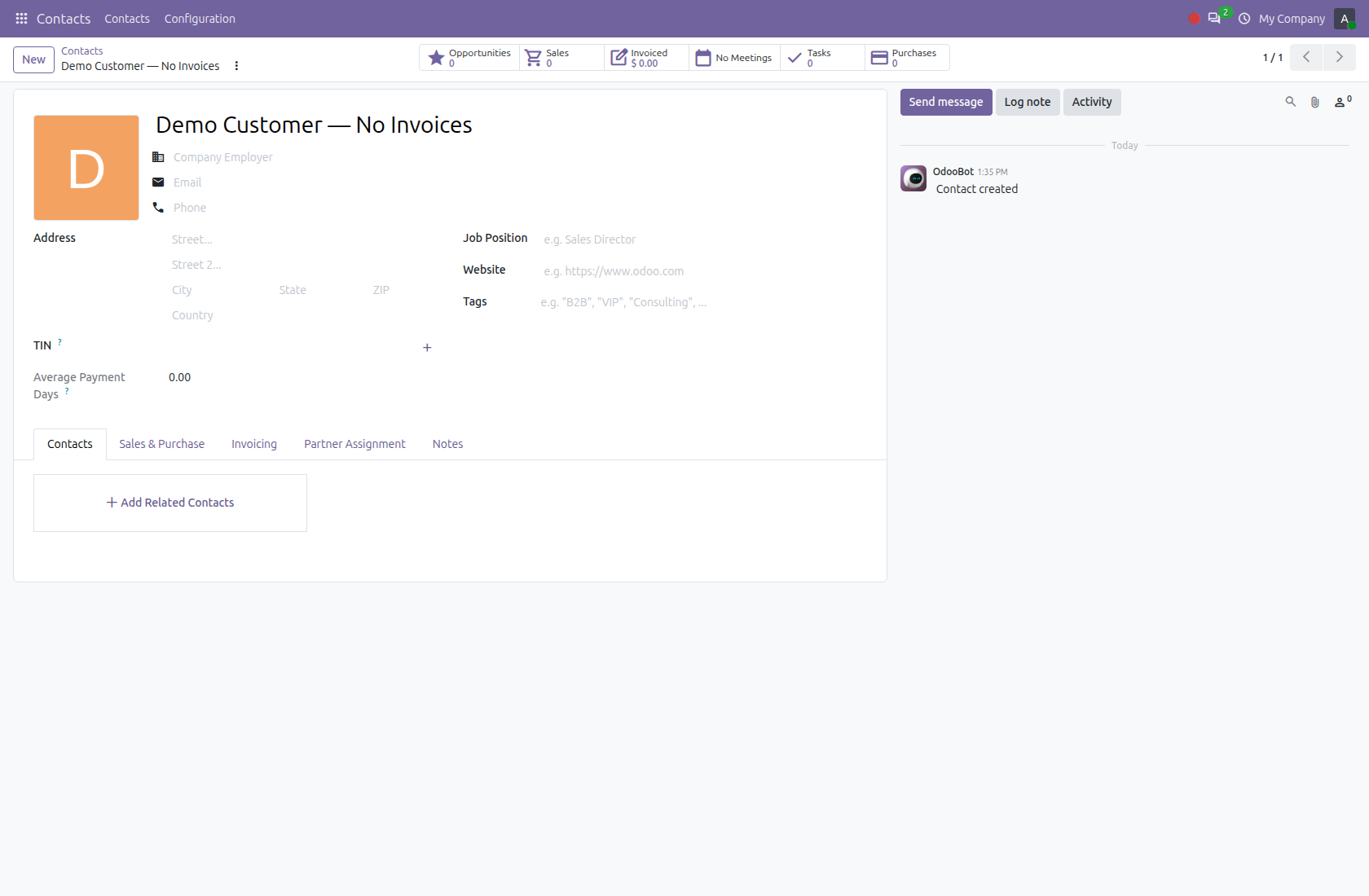
1. Open a customer and find the metric

After installing the module, an invoicing user can open a customer in Contacts and read Average Payment Days. There is no separate calculation button or module setup form. The empty demo customer shows 0.00 because it has no qualifying posted customer invoices in the current company; this alone does not prove that the customer pays immediately.

1. Open a customer and find the metric

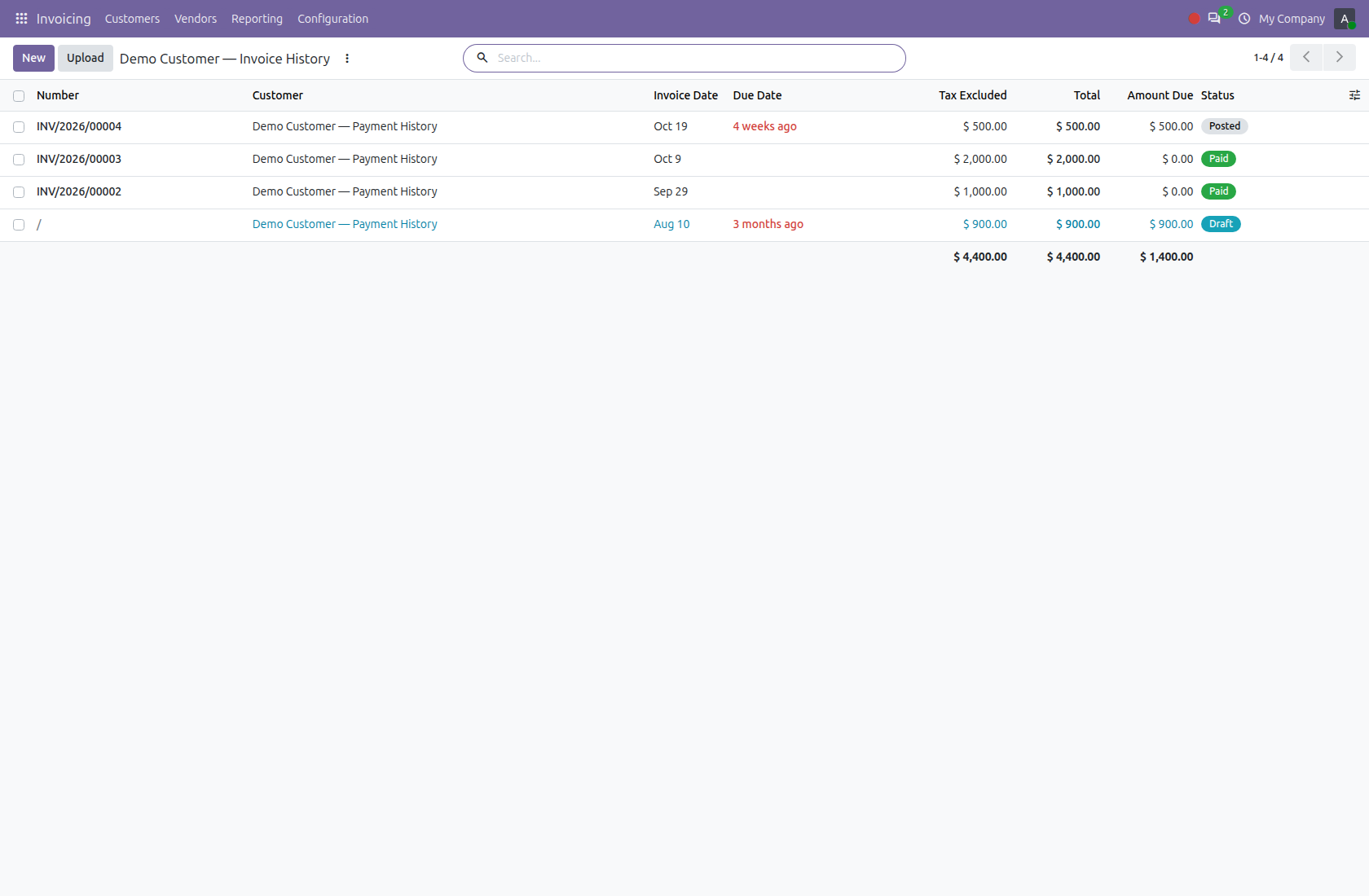
2. Review the customer’s invoice history

Use the customer’s Invoiced smart button or filter customer invoices to that customer. The demonstration history contains two paid invoices, one posted open invoice and an old draft. The calculation uses qualifying posted customer invoices in the current company. Draft invoices, vendor bills and customer credit notes do not contribute to this average.

2. Review the customer’s invoice history

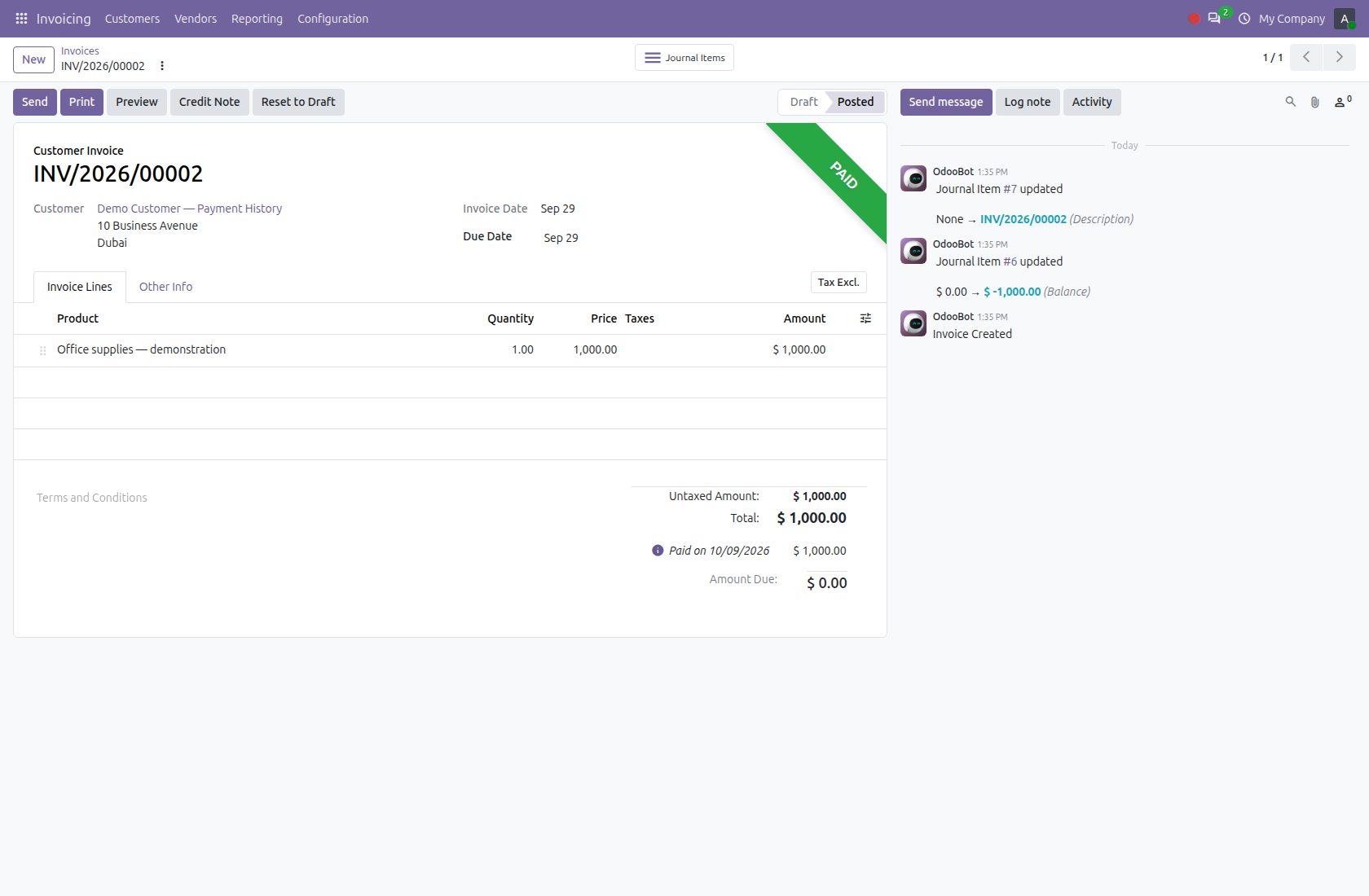
3. Understand the elapsed days on a paid invoice

For a paid invoice, the module uses Invoice Date through the recorded settlement date. The shown invoice is dated September 29 and marked paid on October 9, giving 10 days. The second paid invoice in this example contributes 20 days. The metric measures elapsed calendar days from the invoice date, rather than days overdue after the due date.

3. Understand the elapsed days on a paid invoice

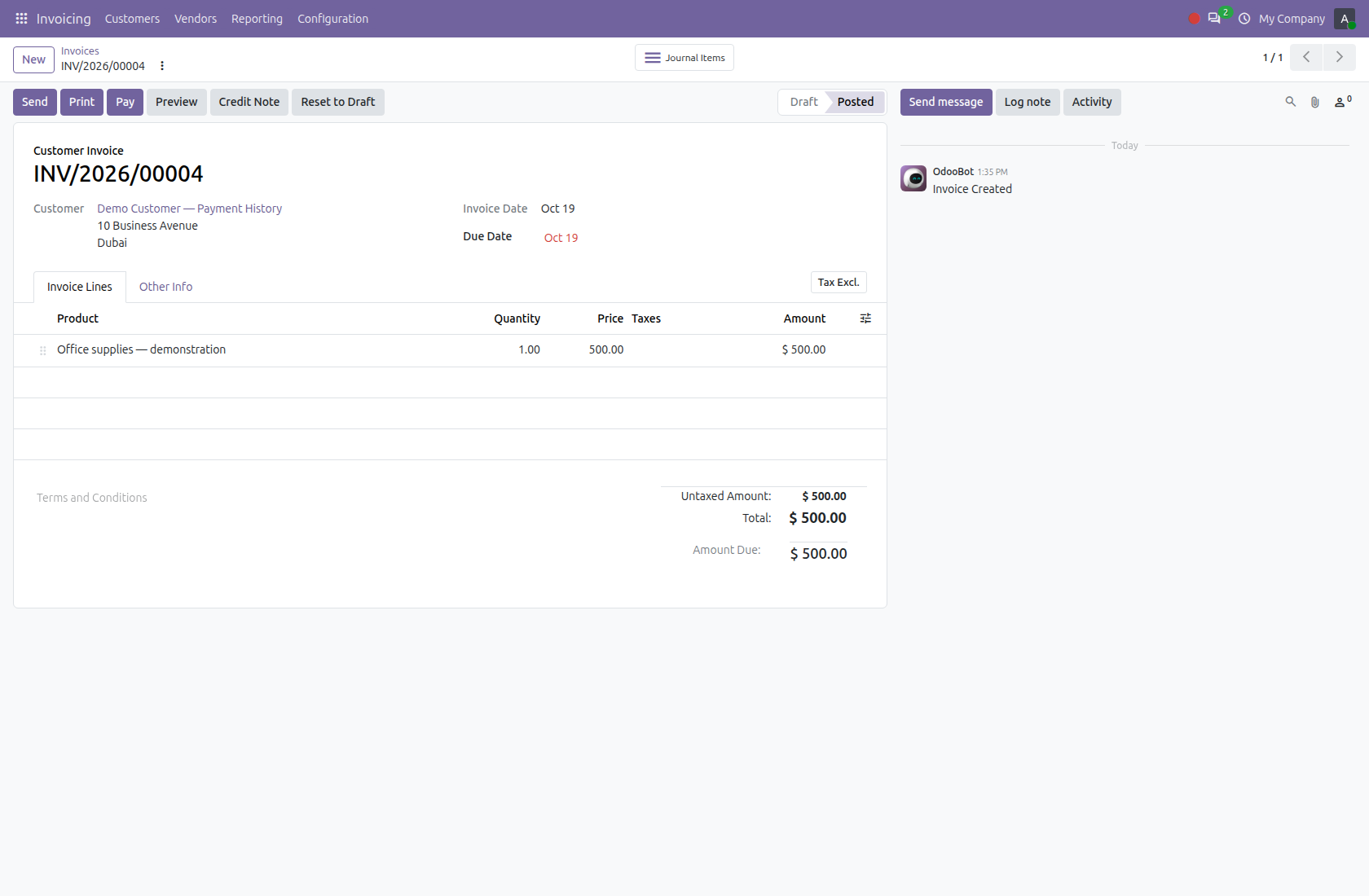
4. Include open invoices using their current age

A posted open or partially paid invoice counts from Invoice Date through today. Here the unpaid invoice dated October 19 is 30 days old on the demo capture date, November 18. Its 500.00 amount is still due. An invoice that remains open can increase the average as days pass, even if no new invoices are created.

4. Include open invoices using their current age

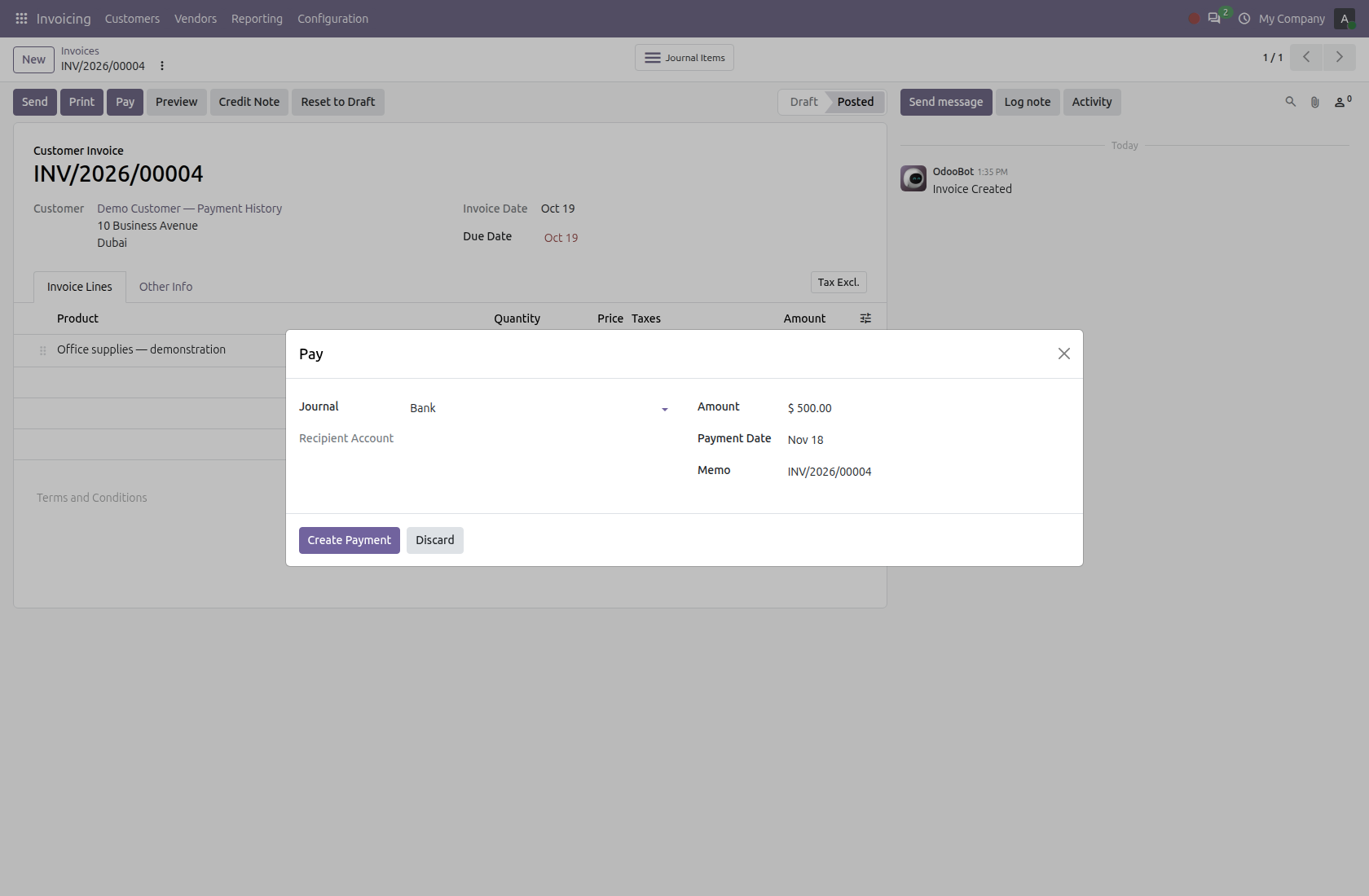
5. Record payments through the normal invoice workflow

Use Pay on the invoice and review the journal, amount and Payment Date before creating the payment. Complete the required normal accounting and reconciliation steps so Odoo records the invoice’s settlement. The screenshot shows the payment dialog before confirmation. The module reads invoice and settlement information; it does not collect money, post payments automatically or replace payment reconciliation.

5. Record payments through the normal invoice workflow

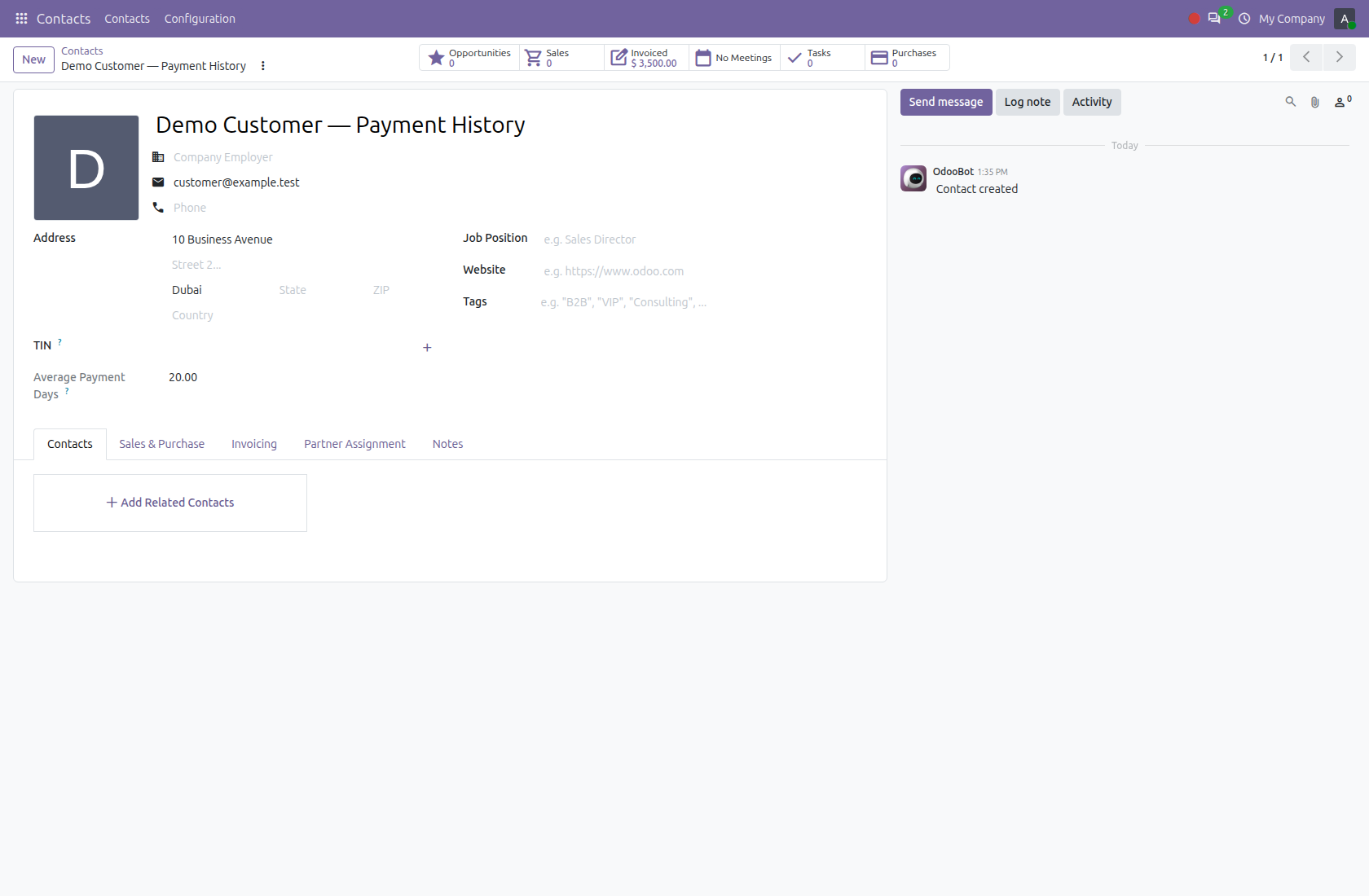
6. Return to the customer and read the result

Reopen or refresh the customer to see the read-only average. For this example, the contributing durations are 10 days, 20 days and 30 days: (10 + 20 + 30) ÷ 3 = 20.00 days. The old draft is excluded. Each qualifying invoice contributes one duration, so this is an invoice-count average, not an amount-weighted calculation. Open-invoice figures use the date when they are viewed.

6. Return to the customer and read the result

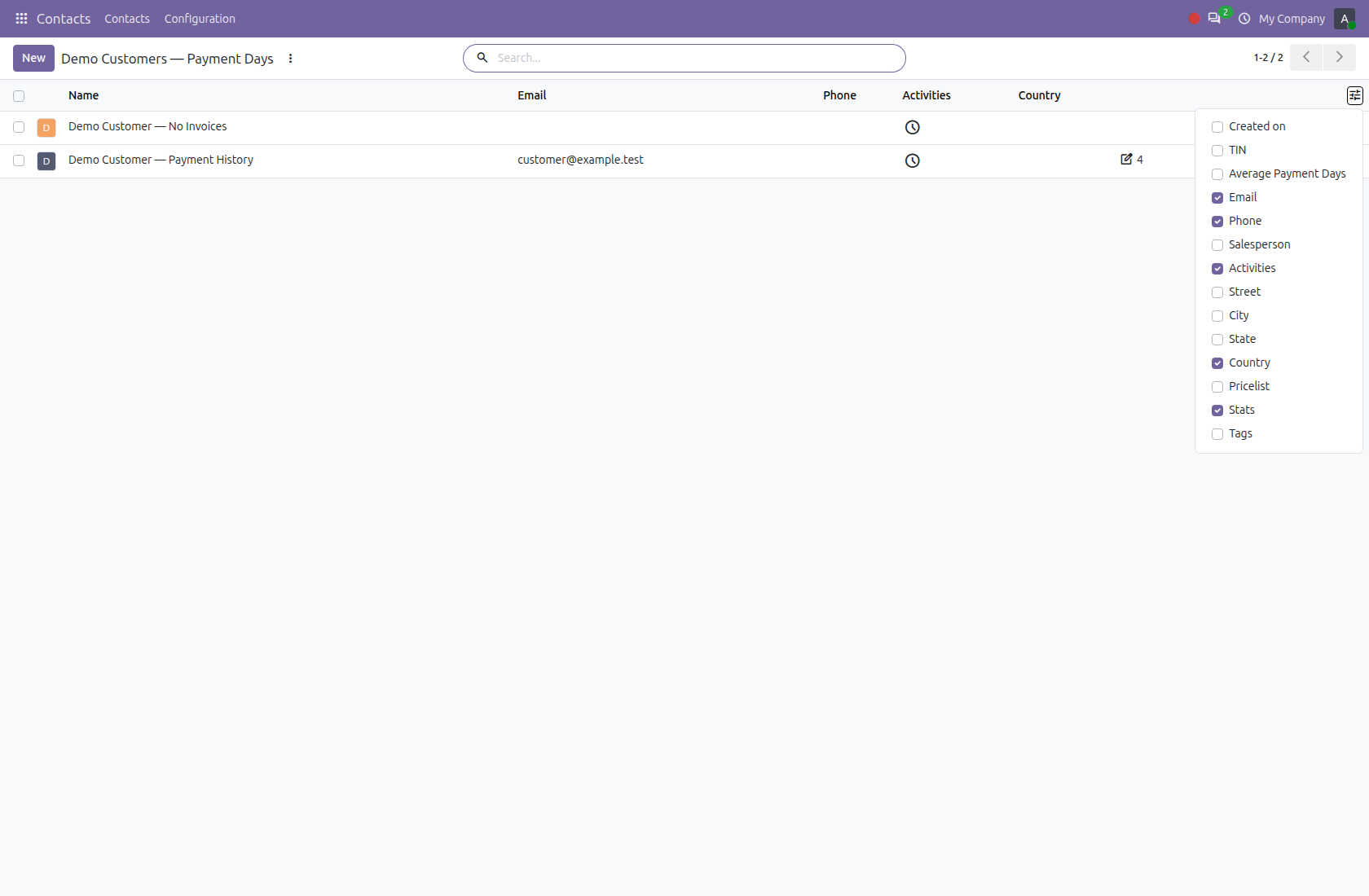
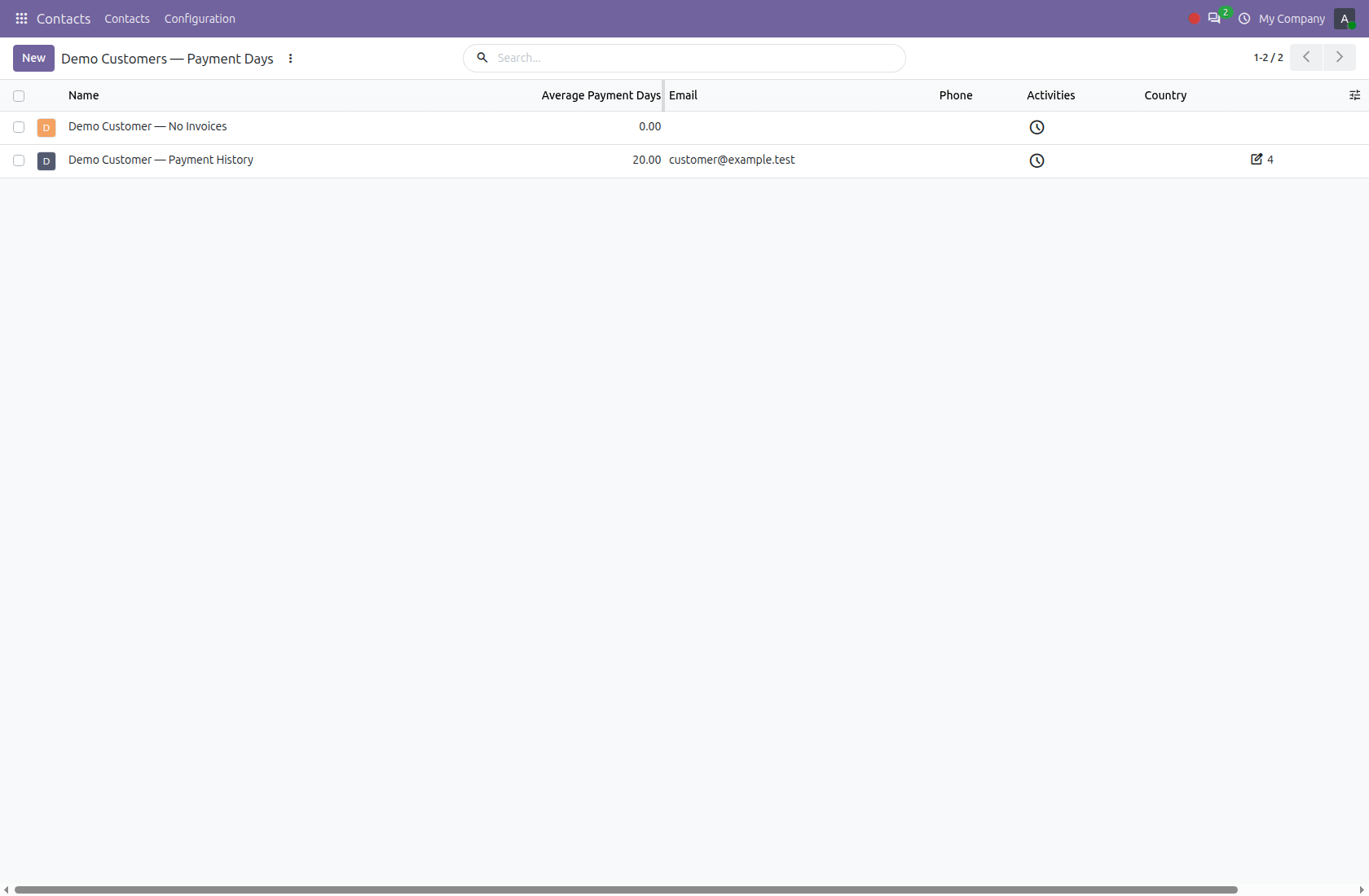
7. Enable the optional customer-list column

Switch Contacts to list view and open the column selector. Enable Average Payment Days to display the metric beside customer names. The field remains restricted to users with the applicable invoicing permission. This optional column lets staff review multiple customers without opening each contact.

7. Enable the optional customer-list column

8. Compare customers in the selected company

The list now shows 20.00 for Demo Customer — Payment History and 0.00 for Demo Customer — No Invoices. Review the underlying invoices when interpreting a result: a zero may simply mean no qualifying history. The computation is scoped to the current company and rolls up invoice history to the commercial customer; it is not a combined cross-company average.

8. Compare customers in the selected company

Customer Payment Indicator

Legal

License

Odoo Proprietary License v1.0 This software and associated files (the "Software") may only be used (executed, modified, executed after modifications) if you have purchased a valid license from the authors, typically via Odoo Apps, or if you have received a written agreement from the authors of the Software (see the COPYRIGHT file). You may develop Odoo modules that use the Software as a library (typically by depending on it, importing it and using its resources), but without copying any source code or material from the Software. You may distribute those modules under the license of your choice, provided that this license is compatible with the terms of the Odoo Proprietary License (For example: LGPL, MIT, or proprietary licenses similar to this one). It is forbidden to publish, distribute, sublicense, or sell copies of the Software or modified copies of the Software. The above copyright notice and this permission notice must be included in all copies or substantial portions of the Software. THE SOFTWARE IS PROVIDED "AS IS", WITHOUT WARRANTY OF ANY KIND, EXPRESS OR IMPLIED, INCLUDING BUT NOT LIMITED TO THE WARRANTIES OF MERCHANTABILITY, FITNESS FOR A PARTICULAR PURPOSE AND NONINFRINGEMENT. IN NO EVENT SHALL THE AUTHORS OR COPYRIGHT HOLDERS BE LIABLE FOR ANY CLAIM, DAMAGES OR OTHER LIABILITY, WHETHER IN AN ACTION OF CONTRACT, TORT OR OTHERWISE, ARISING FROM, OUT OF OR IN CONNECTION WITH THE SOFTWARE OR THE USE OR OTHER DEALINGS IN THE SOFTWARE

Terms

Terms and conditions

OdooSphere Apps Terms & Conditions

By purchasing an app from OdooSphere, the customer agrees to the following terms.

Payment

All payments must be completed immediately through the website checkout. Orders are processed only after successful payment confirmation from the payment provider.

Delivery

After payment confirmation, the purchased module will be delivered digitally as a ZIP file through email or the customer portal, where applicable.

Support Period

Each purchased app includes 90 days of free support from the purchase date.

  • Help during the installation process
  • Assistance with module setup and basic configuration
  • Bug fixes related to the purchased module
  • Guidance for using the app as described on the product page

Support Exclusions

  • Custom feature development
  • Changes for special business workflows
  • Odoo server setup, hosting, or deployment issues
  • Conflicts caused by third-party modules
  • Migration to another Odoo version unless clearly included
  • Issues caused by direct changes to the module source code
  • Training, data entry, or consulting beyond the purchased app scope

Compatibility

Apps are provided for the Odoo versions mentioned on the product page. The customer is responsible for selecting the correct Odoo version before purchase.

Refund Policy

Since apps are digital products delivered after payment, purchases are generally non-refundable. Refunds may be considered only if payment was duplicated, the ZIP file was not delivered, or the app cannot work on the listed compatible Odoo version due to a confirmed issue in the delivered module.

License & Usage

The purchased app is licensed for use by the purchasing customer or company. Reselling, redistributing, publishing, or sharing the module with third parties is not allowed without written permission from OdooSphere.

Updates

Free updates are not guaranteed unless specifically mentioned on the product page. Bug fixes within the 90-day support period may be provided when the issue is confirmed to be caused by the purchased app.

Limitation of Liability

OdooSphere is not responsible for business losses, data loss, downtime, third-party service issues, or problems caused by incorrect installation, custom changes, or incompatible modules.

Contact: odoosphere10@gmail.com

Related modules

More in this category

Reviews

Discuss this module

No reviews yet

Logged-in users can ask questions, discuss implementation details, and rate this module. Your rating updates the app score across the marketplace.