Skip to Content
POS Multiples Quantity
v20.0 Sales/Point of Sale OPL-1

POS Multiples Quantity

No reviews yet · 0 bought
$ odoo install os_pos_multiples_quantity
POS Multiples Quantity

Module index

App product page index

os_pos_multiples_quantity
Community
Enterprise

POS Multiples Quantity

Add a full pack with one tap or barcode scan.

Overview

Set a pack quantity for a product and enable it on selected POS registers. Cashiers add one full pack per tap or standard barcode scan. Odoo handles line merging and pricing through the normal checkout flow.

Features

  • Enable pack quantities per register. Other registers keep standard single-unit entry.
  • Set a pack size per product template. Products with a pack size of one behave as usual.
  • Tap or scan repeatedly to add another pack to the same compatible cart line.
  • Keep native quantities for returns, scale input, and barcodes that carry a value.

Configuration

Enable Allow Multiples Quantity in Point of Sale → Configuration → Settings for the register you want to use. Set Multiples of Quantity on the product form, then reload the register. Choose a pack size that fits the product’s unit of measure. Cashiers can still adjust the quantity with the numpad.

Functional Walkthrough

Walkthrough shown on Odoo 19.

1. Enable pack quantities for one register

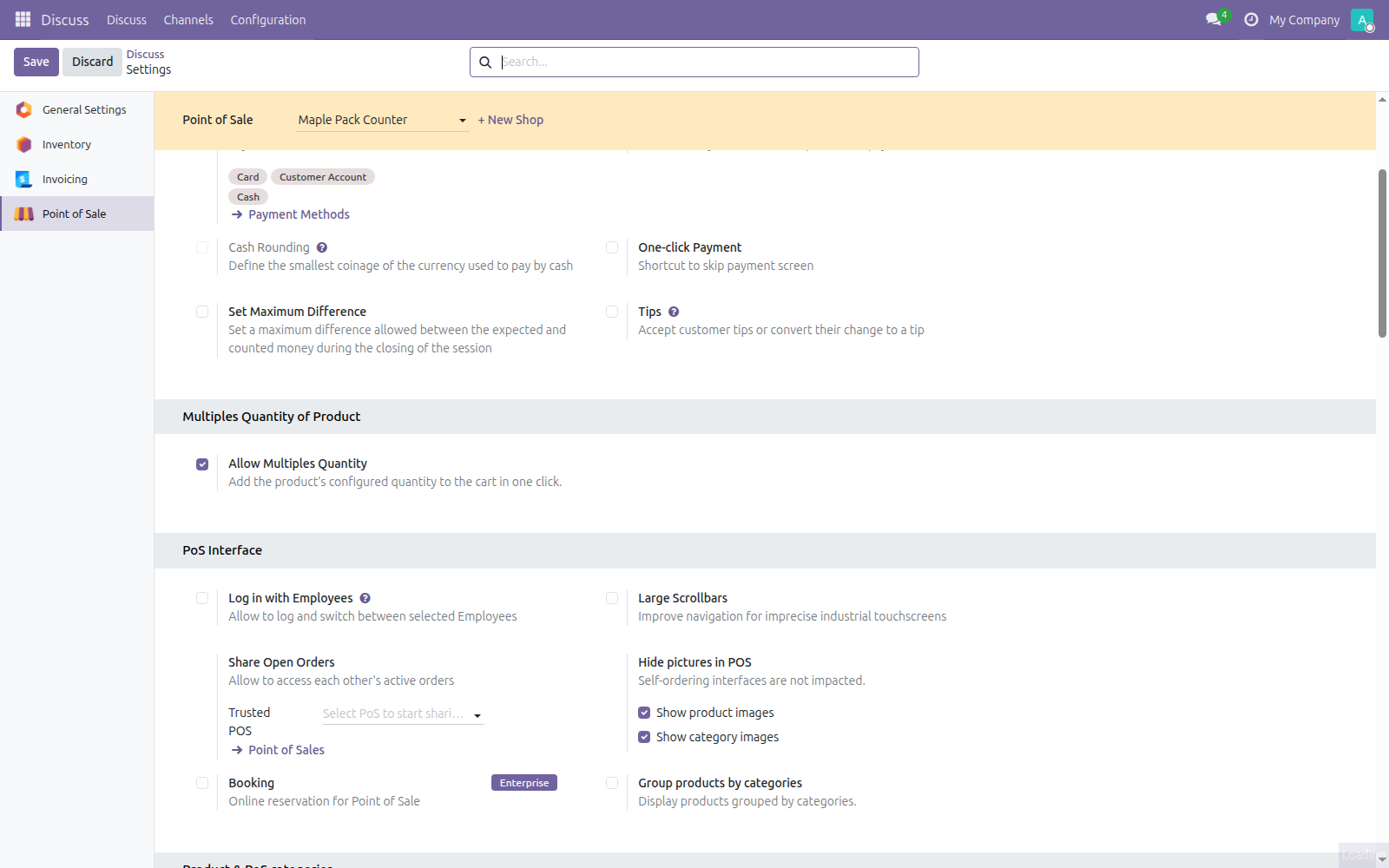
In Point of Sale → Configuration → Settings, choose Maple Pack Counter. Under Multiples Quantity of Product, turn on Allow Multiples Quantity and save.

Enable pack quantities for one register

2. Set the product’s pack size

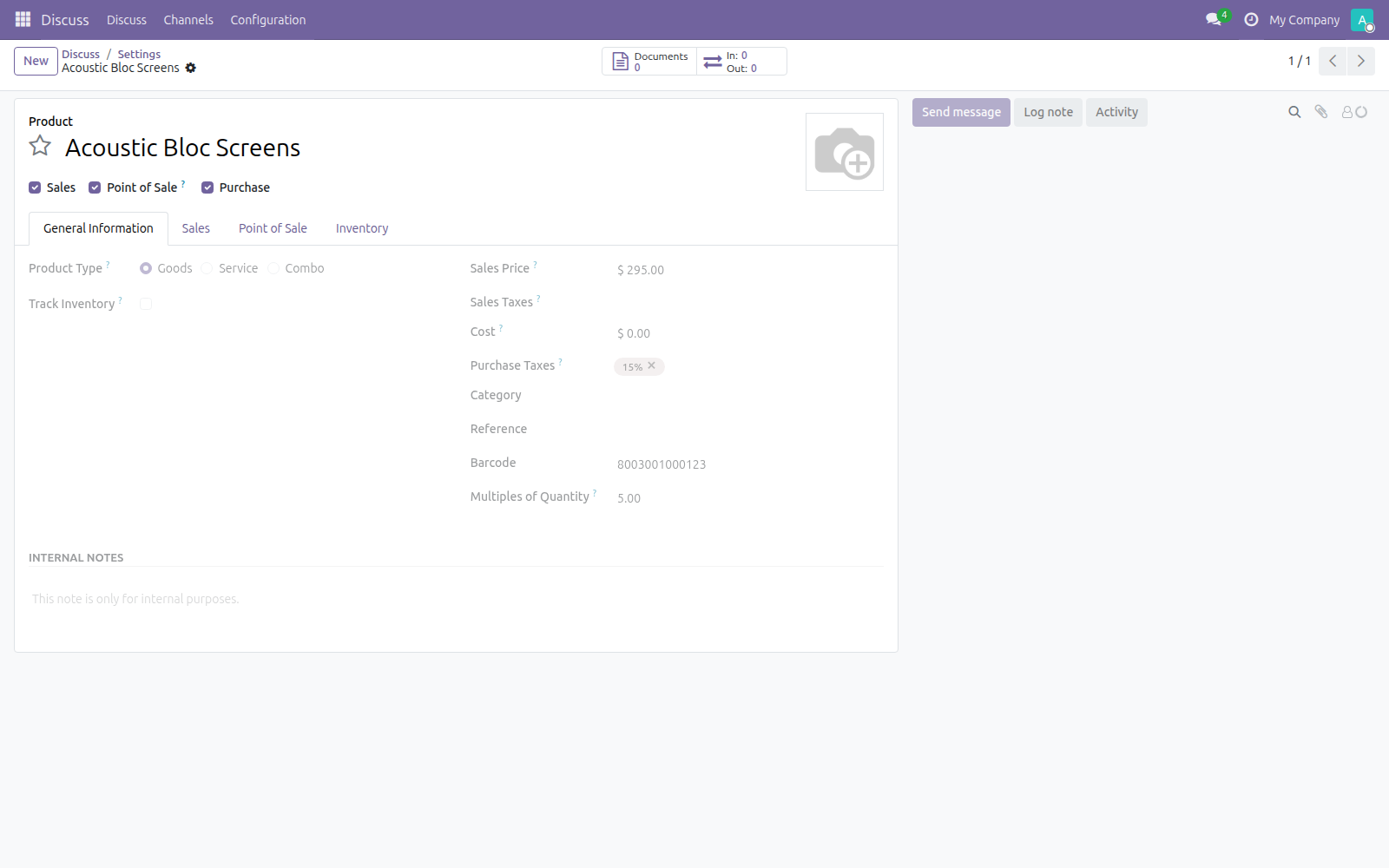
Open Acoustic Bloc Screens. In General Information, set Multiples of Quantity to 5. All variants of this product share the same pack size.

Set the product’s pack size

3. Add five units with one tap

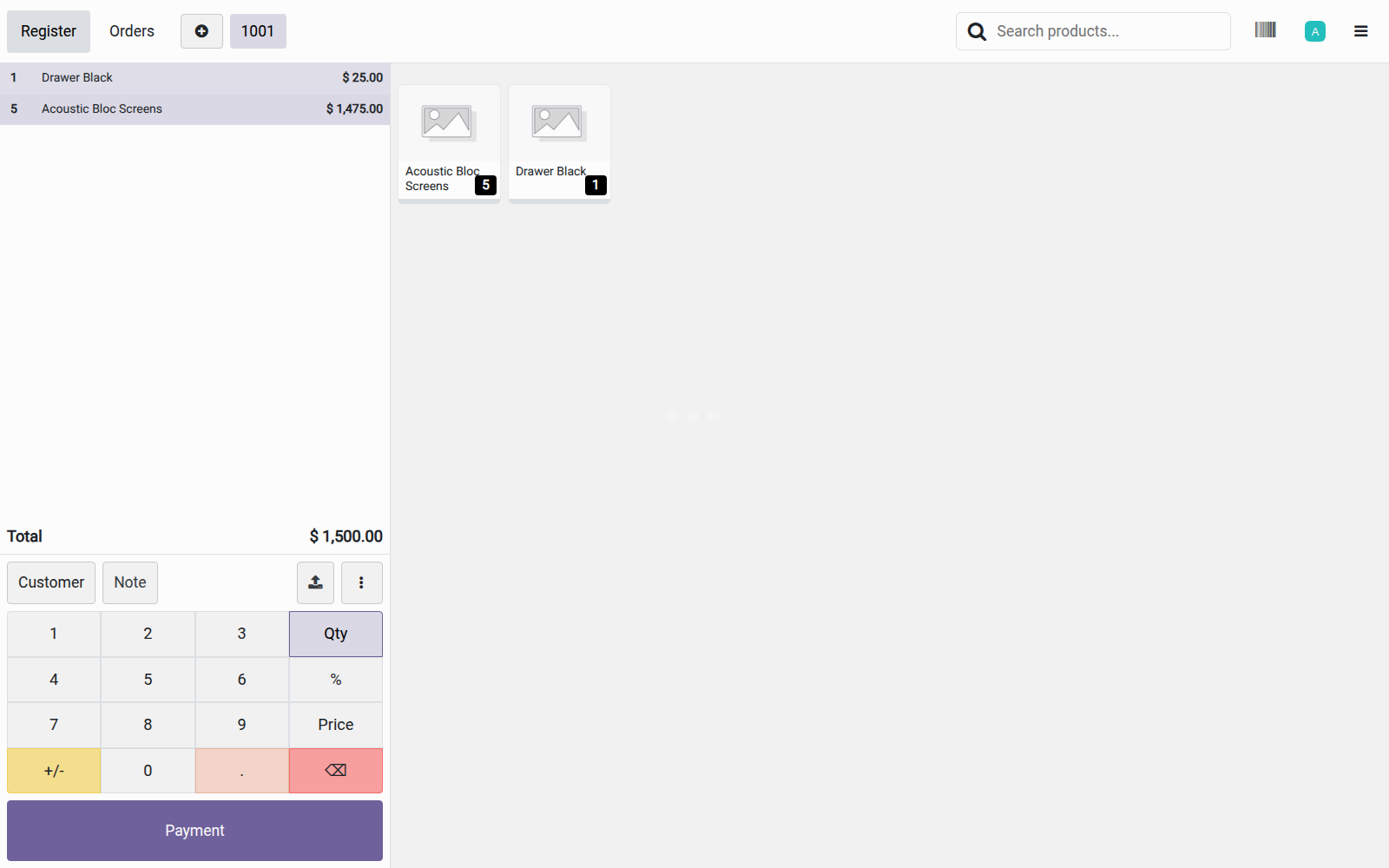
Open the enabled register. Add one Drawer Black at $25, then tap Acoustic Bloc Screens once. Five screens at $295 each make a $1,475 line and a $1,500 cart.

Add five units with one tap

4. Tap again to add another pack

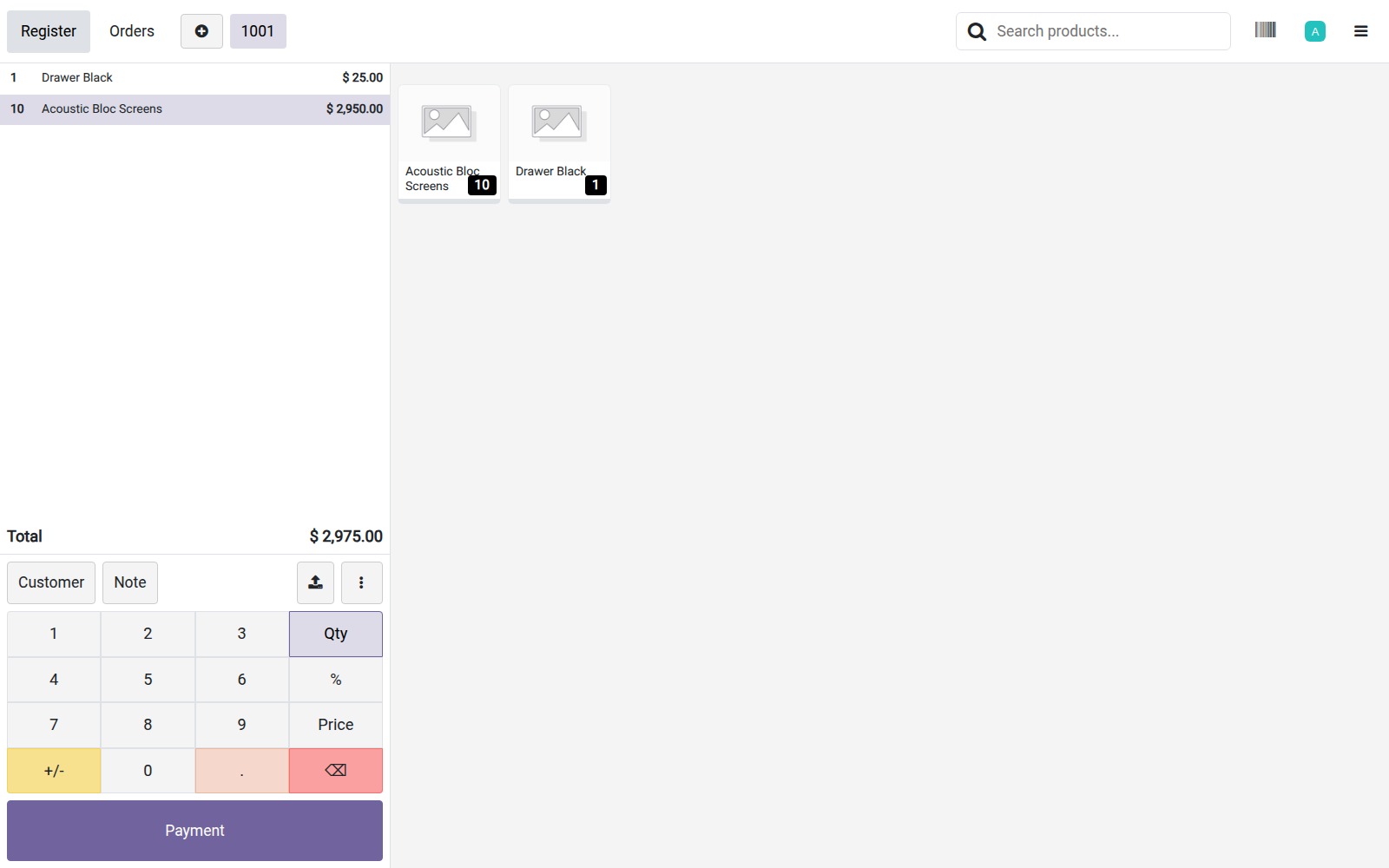
Tap Acoustic Bloc Screens again. Odoo merges the compatible lines, bringing the screen quantity to 10 and its line total to $2,950.

Tap again to add another pack

5. Scan to add a third pack

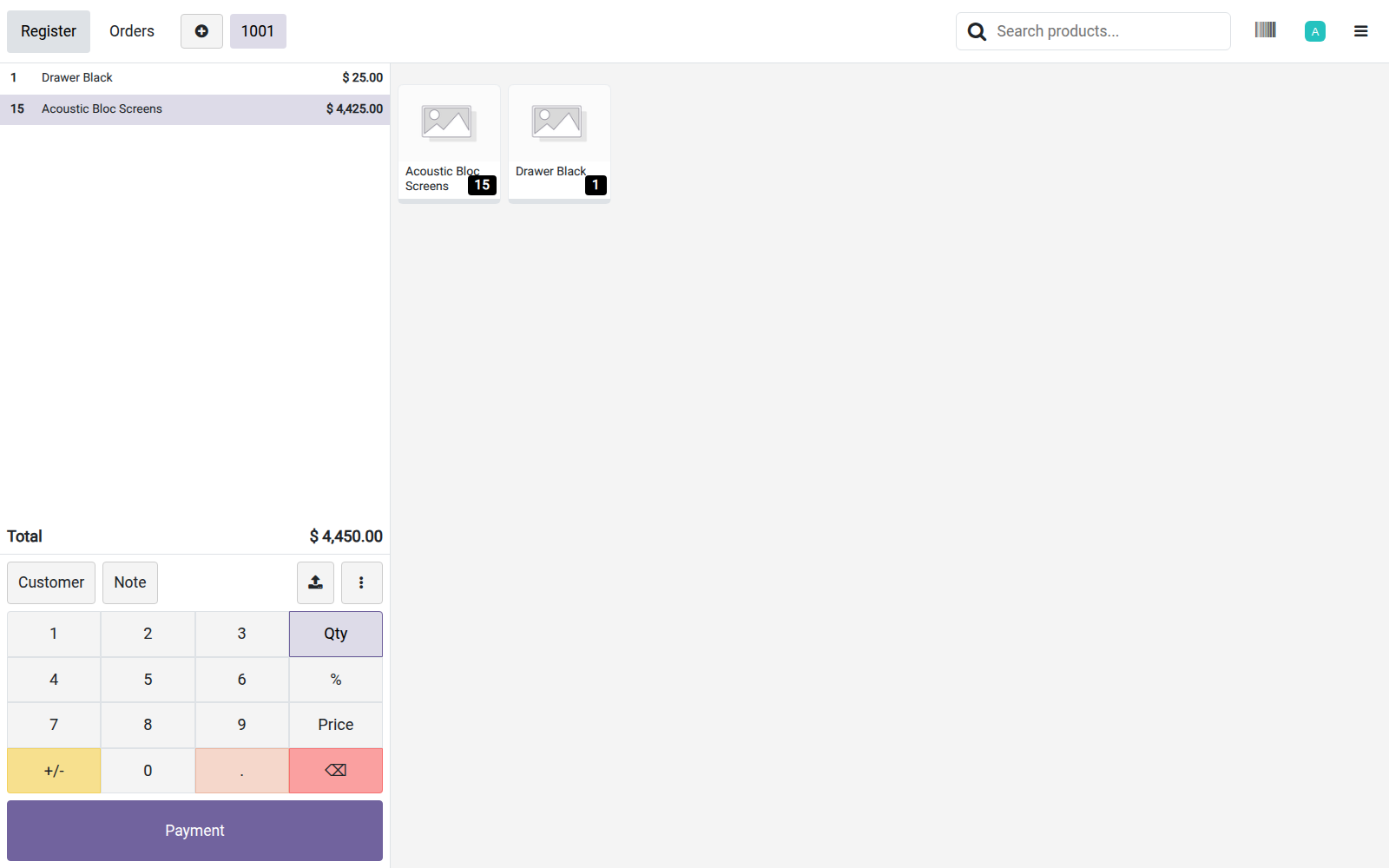
Scan the product’s standard barcode. The same screen line now contains 15 units. Barcodes that encode a quantity, weight, price or discount keep their native behavior.

Scan to add a third pack

6. Use standard quantities on another register

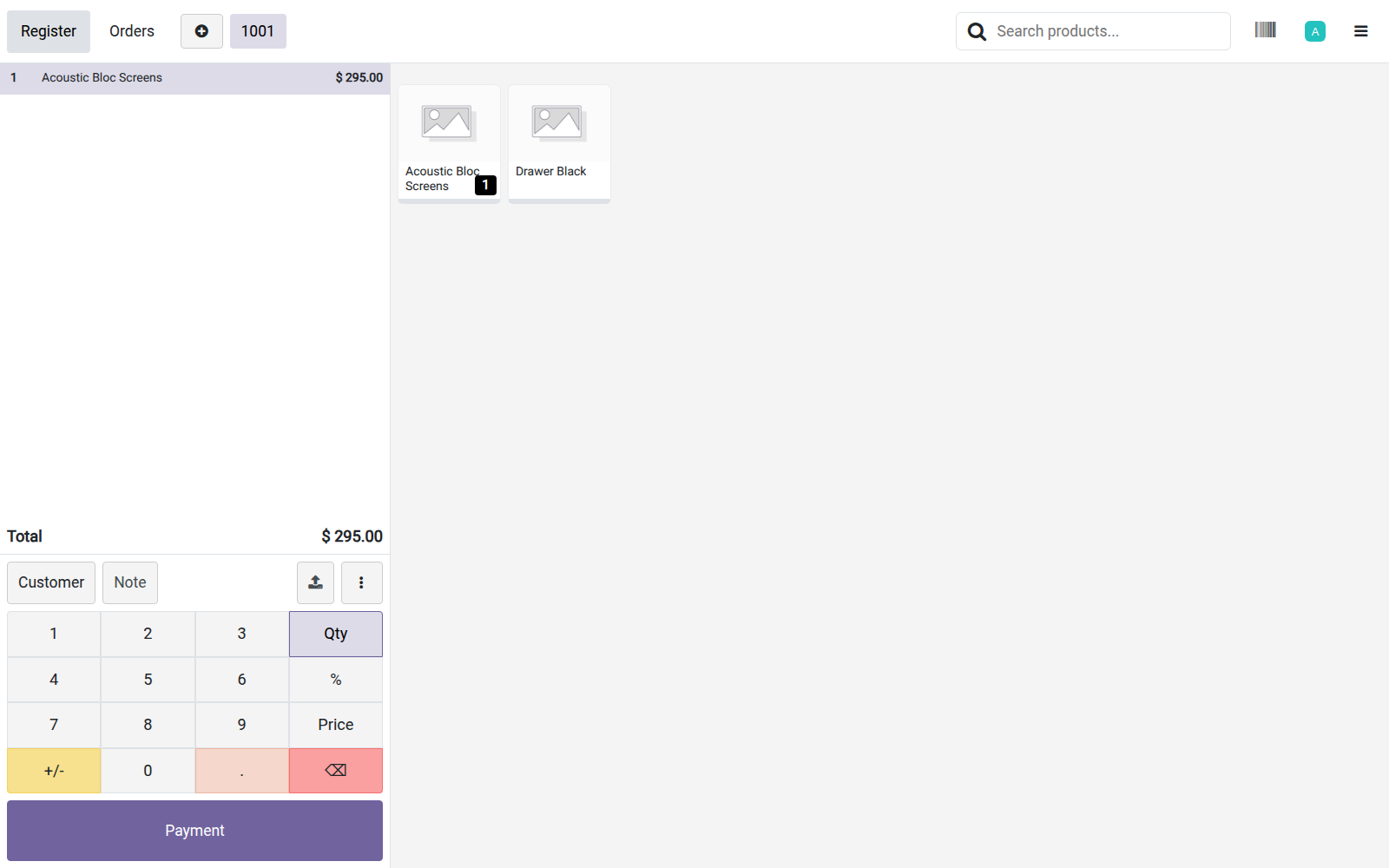
Open Maple Standard Counter with the setting off. Tap the same product once to add one screen at $295.

Use standard quantities on another register

Legal

License

Odoo Proprietary License v1.0 This software and associated files (the "Software") may only be used (executed, modified, executed after modifications) if you have purchased a valid license from the authors, typically via Odoo Apps, or if you have received a written agreement from the authors of the Software (see the COPYRIGHT file). You may develop Odoo modules that use the Software as a library (typically by depending on it, importing it and using its resources), but without copying any source code or material from the Software. You may distribute those modules under the license of your choice, provided that this license is compatible with the terms of the Odoo Proprietary License (For example: LGPL, MIT, or proprietary licenses similar to this one). It is forbidden to publish, distribute, sublicense, or sell copies of the Software or modified copies of the Software. The above copyright notice and this permission notice must be included in all copies or substantial portions of the Software. THE SOFTWARE IS PROVIDED "AS IS", WITHOUT WARRANTY OF ANY KIND, EXPRESS OR IMPLIED, INCLUDING BUT NOT LIMITED TO THE WARRANTIES OF MERCHANTABILITY, FITNESS FOR A PARTICULAR PURPOSE AND NONINFRINGEMENT. IN NO EVENT SHALL THE AUTHORS OR COPYRIGHT HOLDERS BE LIABLE FOR ANY CLAIM, DAMAGES OR OTHER LIABILITY, WHETHER IN AN ACTION OF CONTRACT, TORT OR OTHERWISE, ARISING FROM, OUT OF OR IN CONNECTION WITH THE SOFTWARE OR THE USE OR OTHER DEALINGS IN THE SOFTWARE

Terms

Terms and conditions

OdooSphere Apps Terms & Conditions

By purchasing an app from OdooSphere, the customer agrees to the following terms.

Payment

All payments must be completed immediately through the website checkout. Orders are processed only after successful payment confirmation from the payment provider.

Delivery

After payment confirmation, the purchased module will be delivered digitally as a ZIP file through email or the customer portal, where applicable.

Support Period

Each purchased app includes 90 days of free support from the purchase date.

  • Help during the installation process
  • Assistance with module setup and basic configuration
  • Bug fixes related to the purchased module
  • Guidance for using the app as described on the product page

Support Exclusions

  • Custom feature development
  • Changes for special business workflows
  • Odoo server setup, hosting, or deployment issues
  • Conflicts caused by third-party modules
  • Migration to another Odoo version unless clearly included
  • Issues caused by direct changes to the module source code
  • Training, data entry, or consulting beyond the purchased app scope

Compatibility

Apps are provided for the Odoo versions mentioned on the product page. The customer is responsible for selecting the correct Odoo version before purchase.

Refund Policy

Since apps are digital products delivered after payment, purchases are generally non-refundable. Refunds may be considered only if payment was duplicated, the ZIP file was not delivered, or the app cannot work on the listed compatible Odoo version due to a confirmed issue in the delivered module.

License & Usage

The purchased app is licensed for use by the purchasing customer or company. Reselling, redistributing, publishing, or sharing the module with third parties is not allowed without written permission from OdooSphere.

Updates

Free updates are not guaranteed unless specifically mentioned on the product page. Bug fixes within the 90-day support period may be provided when the issue is confirmed to be caused by the purchased app.

Limitation of Liability

OdooSphere is not responsible for business losses, data loss, downtime, third-party service issues, or problems caused by incorrect installation, custom changes, or incompatible modules.

Contact: odoosphere10@gmail.com

Related modules

More in this category

Reviews

Discuss this module

No reviews yet

Logged-in users can ask questions, discuss implementation details, and rate this module. Your rating updates the app score across the marketplace.